Reusable components in JMeter

Why do I need reusable components in a load script?

Ok, so generally speaking a load script may not really need reusable components you think. However there are plenty of reasons to actually use them and use them effectively, efficiently and heavily.

First of all, not all Jmeter load scripts are for a one off effort. There are quite some times that, if not entire scripts, then at least part of a script could be extremely useful to reuse. Think of a nice application, such as a webshop, you may be trying to stress out with Jmeter. While building it I hope the developers were thinking of reuse, so why wouldn’t you while building a script to stress that shop out?

Secondly, when building load scenarios, you may want to reuse a search function, a registration function, a login function, etc. So why not make a bunch of reusable modules or JMX scripts that help you build scenarios by just clicking existing things together rapidly rather than reinvent the wheel over and over for each and every scenario.

I am not even going to mention the default reasoning: standard practice of DRY: Don’t Repeat Yourself! (ok, there, I did it anyway)

Does JMeter allow for it?

Well, that one seems a bit obvious, since I am writing about it here of course 🙂 Yes Jmeter has a wonderful way of dealing with reuse:

All you need is a Module Controller

Jmeter 2.13 Module Controller

or an Include Controller (which I will write a brief how-to about in a followup post):

Jmeter 2.13 Include Controller

Jmeter 2.13 Include Controller

These two can basically do a similar thing, you can reuse either a module or reuse, and by reuse I mean include of course) a complete testplan in a test. The actual working and thus their use and usefullness is quite different though.

The Module Controller keeps everything within one testplan, whereas the Include Controller expects you to have several (at least 2) testplans to use and work with.

How do I use them

Module Controller

The Module Controller is a relatively easy one to explain as the first one. I use this method often when building scenarios which are relatively close to each other, for example for a webshop. The example I am going through below is a very simple basic one. Sticking to a basic description, since I mainly wanted to show that it is possible to use reusable components and how you can do it.
Imagine a few scenarios for a webshop:

Scenario 1:

  1. Create account
  2. While logged in browse the webshop
  3. Add items to your shopping cart
  4. Go through Checkout
  5. Log out of webshop

Scenario 2:

  1. Browse to the webshop
  2. Add items to your shopping cart
  3. Go to Checkout
  4. Create account on Checkout
  5. Go through checkout
  6. Log out of webshop

Scenario 3:

  1. Browse to the webshop
  2. Sign in to the webshop with an account with at least 1 purchase
  3. Do something the My Account
  4. Add items to shopping basket and leave them there
  5. Log Off

In these scenarios there are several steps that are repeated: Sign up for an account, log off, add some items to a basket. If you want to make sure you do not need to maintain these steps at different spots in your script, it make perfect sense to make these steps reusable. This is after all what you would do with test automation as well, right? Let’s do just that!

What do you need in Jmeter:

Testplan
 > <DISABLED>Threadgroup
    > Simple Controller with Signup steps
        > Samplers etc needed to run through the signup flow
    > Simple Controller with LogOff steps
</DISABLED>
  > Threadgroup
    > Module Controller - In this controller you can choose which controller you want to use. Select the Signup Controller
    > Simple Controller
        > Samplers etc. needed to execute the following steps

Your JMX could now look something like this:

JmeterModuleController

Include Controller


This will be coming along in a followup post at a later time.
Teaching test automation & performance testing

I was asked to share some knowledge on test automation and load and performance testing by Polteq. The company is running a “Special Development Program” in which employees from all levels of the company, ranging from junior engineers to senior consultants, get the opportunity to follow trainings and courses in a range of things. Varying from social skills to hard technical skills. It is the latter I have been asked to help provide some training for, which I do gladly.

warning-mass-confusion-aheadThere is however quite a challenge, as said, the audience ranges from junior to quite senior, but also from technically strong to technically challenged (my apologies to all the colleagues I am insulting with this statement, but I know you can forgive me:) ). So how do I go about preparing two trainings, one about test automation and one about load and performance testing, for such a diverse group? The duration of these sessions is also quite limited, making it even more difficult to come up with something sane to do in these evenings.JMeter

Oh! To make my life easier, I have been telling everyone, during a bunch of company meetings and updates over the past month, I do not believe sitting back and listening to someone broadcasting the information will help in learning something to do with technical skills.

Sikuli ScriptThe trainings need to be interactive, but also guided and somewhat personalized. Thus far I have come up with the idea of preparing a bunch of USB sticks with a set of portable applications I use regularly to automate stuff with. When in this context I say automate, I really mean hack something together which does the job and at the end of the project (or my involvement with the project) gets thrown away. Do I indeed want to teach the habit of writing throw-away-code?autoit-logo

On top of that, do I want to teach some “technical” or basic programing skills based on examples with tools, which should in their own right not be used to automate these things? Actually, I believe I do! My goal for these evenings will be to get this group excited to use and abuse tools to their own advantage! The tools I already chose, now I need to figure out some interesting, useful and enjoyable targets for these people to hack their way around. Tips anyone?

Difference between performance testing and functional automated testing

For the last few months I have been working on performance testing quite a lot and when discussing it with colleagues I started to notice that it can be easily confused with testautomation. Based on discussions I have had with customers and sales people I ran into the question of “what is the exact difference between the two? Both are a form of automated testing in the end”.

Performance testing == automated testing… ?

Both Performance testing and automated testing are indeed some form of executing simple checks with a tool. The most obvious difference being the objective of running the test and analysing the outcomes. If they are indeed so similar, does that mean you can use your automated tests to also run performance tests and vice versa?

What is the difference?

I believe the answer is both easy and challenging to explain. The main difference is in the verifications and assertions done in the two different test types. In functional test automation (let’s at least call it that for now), the verifications and assertions done are all oriented to validating that the actual full functionality as described in the specification, was passed. Whereas in performance testing these verifications and assertions are more or less focused on validating that all data and especially the expected data is loaded.

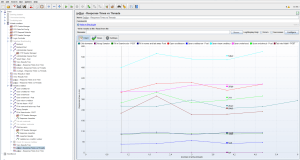
jmeter-snapshotA lot of the performance tests I have executed over the past year or so, have not used the Graphical User Interface. Instead the tests use the communications underneath the GUI, such as XML, JSON or whatever else passes between server and client. In these performance tests the functionality of the application under test is still run through by the tests, so a functional walkthrough/test does get executed, my assertions however do not necessarily validate that and definitely not on a level that would be acceptable for normal functional test automation. In other words, most of the performance tests cannot (easily or blindly) be reused as functional test automation.

Now you might think: “So can we put functional test automation to work as a performance test, if the other way around cannot easily be done maybe it will work this way?”

In my experience the answer to this is similar as when trying to use performance tests as a functional test automation. It can be done, but will not really give you the leverage in performance testing you quite likely would like to have. Running functional test automation generally requires the application to run. If the application is a webapplication you might get away with running the browser headless (e.g. just the rendering engine, not the full GUI version of the browser) in order to prevent the need for a load of virtual machines to generate even a little bit of load. When the SUT is a client/server application however the functional test automation generally requires the actual client to run, making any kind of load really expensive.

How can we utilize the functional test automation for performance testing?

performance and testautomation combined

performance and testautomation combined

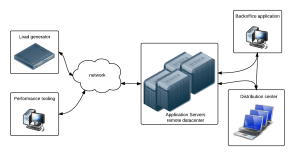
One of the wonderful possibilities is combining functional testing, performance testing and load testing. By adjusting the functional test automation to not only record pass/fail but also render times of screens/objects, the functional test automation suite turns into a performance monitor. Now you start your load generator to test the server response times during load, once the target load is reached, you  start the functional test automation suite to walk through a solid test set and measure the actual times it takes on a warm or hot system to run everything through a full rendered environment. This gives wonderful insights into what the end-users may experience during heavy loads on the server.

Selecting performance test tooling – Part 4

Decision making time

Decision making process

Decision making process

Considering the fact that I am not too fond of Sikuli and SilkTest is disqualified because it cannot deal with the remote application the decision was tough and yet simple. I have an immediate need which needs fulfilling and besides that a customer wish to look ahead and assume we will be working on test automation in the (near) future for regression testing and end-to-end testing.

The choice was made to not go for the, very affordable, commercial tool at this point in time, but rather go the open source road. Sikuli it is.

Experiences with Sikuli Sikuli Script

As stated above Sikuli was not my preferred tool, since it is heavily depending on screen captures, however when I was finally working with it I started to get a liking for it. It has grown on me by now. Scripting in it can be both difficult and extremely easy.

I decided to approach the functional measuring with SIkuli as a pure testautomation project, but then a bit less reusable since it depends on screenshots. Starting where I generally start; starting the application and logging in to the system, was simple enough. Although still not exactly intuitive. The startup code looks something like this:

cmd = 'mstsc.exe "C:\\Program Files\\RemotePackages\\AppAccNew.rdp"'
def startApp():
    from time import time
    startTime = time()
    Log.elog('Starting Acceptatie RDP Session') 
    App.open(cmd)

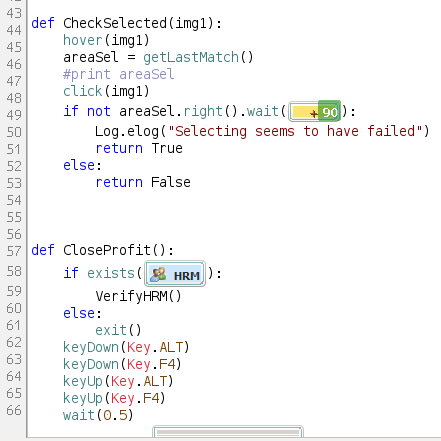
Sikuli Code Snippett On top of a separate, reusable login (and logoff and shutdown) routine, I also built up a nice set of helpful methods for measuring time between an action and the result, verifying that the expected area indeed is selected and quite a few others. These look a bit more odd in my eyes due to the screen captures inline in the code, as you can see here.

The moment the basic functions were there, e.g. click on something and expect some result with a timer in between, the rest was fairly straight forward. We now have a bunch of functional tests which, instead of doing a functional verification are focussed on duration of the calls, but for the rest it is not very far from actual functional automation through Sikuli.

Conclusion

All in all it took some getting used to the fact that there is script combined with screenshots, but now that it is fully up and running the scripting is fast and easy to do. I am quite impressed with what Sikuli can do.

Server scalability explained by a web-comic

Update

On request of the guys of Not Invented Here I have adjusted this post to merely contain 1 actual image of the entire sequence rather than the entire sequence. They are right, the comic should be read where it comes from, they need to eat as well! 🙂 No hard feelings, sorry for the inconvenience of not having the full set in one go though. I understand that was very much appreciated.

Martijn

===
A short intermezzo in which I do not write much sensible. I felt the need to collect this set of comics and share them with an audience who might not yet know it.

I love what “Not invented here” is doing with their latest set of explanations of scalability according to Owen.

Quite often I get to explain hard-to-explain stuff to people, like account managers. project managers etc. who are technically not always the strongest people and may not really grasp the subject of scalability for example. I believe that, with it’s humor this comic does make a clear point… Up to you to decide what you want this point to be.

First episode on Scalability and the terminology

Scalability balloon…

Why care about scalability

Server farms, Round Robins and of course Load Balancing

Data…

Spreading your data and finding your data

If more installments of this series on scalability according to Owen appear they will for sure be added here! 🙂