Server scalability explained by a web-comic

Update

On request of the guys of Not Invented Here I have adjusted this post to merely contain 1 actual image of the entire sequence rather than the entire sequence. They are right, the comic should be read where it comes from, they need to eat as well! 🙂 No hard feelings, sorry for the inconvenience of not having the full set in one go though. I understand that was very much appreciated.

Martijn

===
A short intermezzo in which I do not write much sensible. I felt the need to collect this set of comics and share them with an audience who might not yet know it.

I love what “Not invented here” is doing with their latest set of explanations of scalability according to Owen.

Quite often I get to explain hard-to-explain stuff to people, like account managers. project managers etc. who are technically not always the strongest people and may not really grasp the subject of scalability for example. I believe that, with it’s humor this comic does make a clear point… Up to you to decide what you want this point to be.

First episode on Scalability and the terminology

Scalability balloon…

Why care about scalability

Server farms, Round Robins and of course Load Balancing

Data…

Spreading your data and finding your data

If more installments of this series on scalability according to Owen appear they will for sure be added here! 🙂

Selecting performance test tooling – Part 3

A birthday post… and no, the story has nothing to do with my birthday, it’s just that today is my birthday.

This post became a bit longer than I initially intended so here are some links to jump directly to the specific content:

Some challenges in the PoC…

Following up on my previous posts (here and here) on this topic while executing the Proof of Concept I have run into some interesting challenges.

For starters, I am convinced I started the PoC the wrong way around; I started off with implementing some things in Sikuli rather than in SilkTest. Since SilkTest is, to me, less intuitive than Sikuli, since SilkTest tries to encapsulate a lot of different automation approaches in one tool, whereas Sikuli is focussed on one methodology only, I should have started with that one. However, I didn’t and there is nothing I can do about that anymore now.

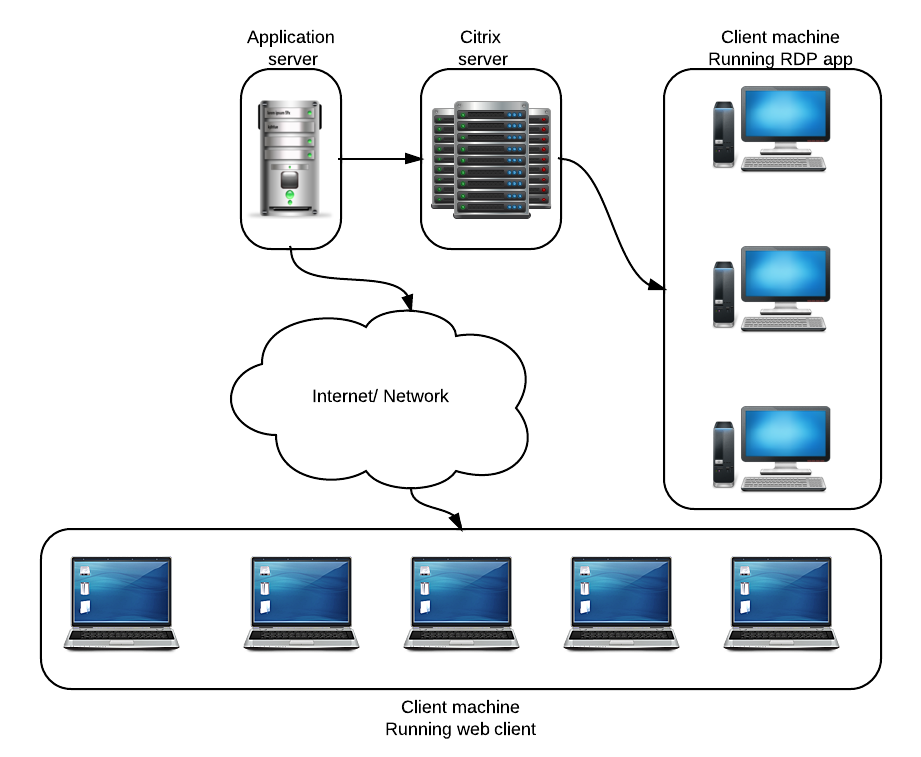
Secondly, the application we are about to put to the test is an application served from a Citrix platform, in other words, it is a remote application. The charter for this project is simple: Measure the performance of the application as the user would experience it. In other words, measure its performance via the RDP tunnel and not directly on the Citrix machine.

The setup is basically as shown in this image (simplified of course)
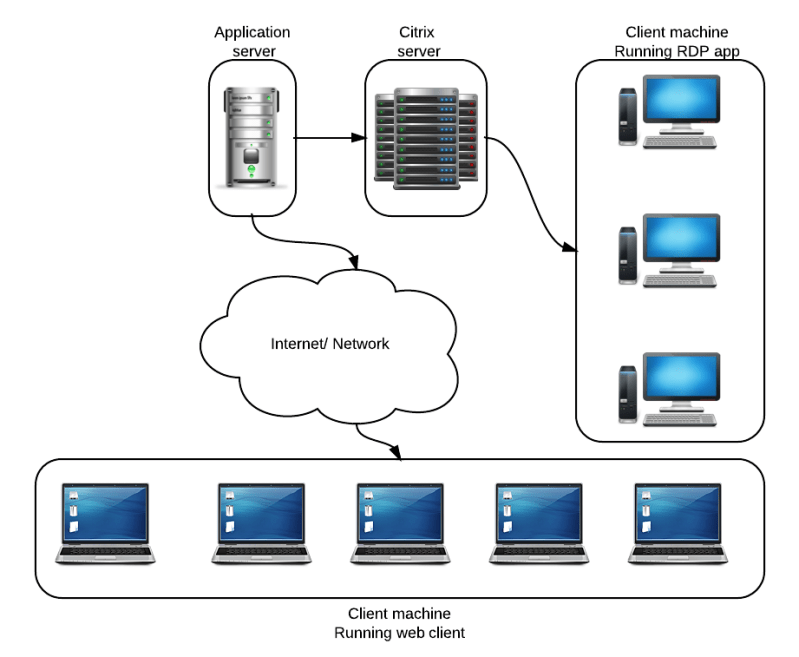
Citrix simplified setup

Simplified picture of the Citrix application setup

Sikuli Sikuli Script Logo

For those not farmiliar with Sikuli, here’s what they say about themselves:

Sikuli Script automates anything you see on the screen. It uses image recognition to identify and control GUI components. It is useful when there is no easy access to a GUI’s internal or source code.

In other words, Sikuli is fully based on image recognition and pattern recognition rather than following the industry standard Object Model.

The good, the bad and the ugly.

Stepping away from the Object Model has some advantages, especially in this application setup, but I will get to that when discussing the Borland setup.

The good

Considering this is a Proof of Concept I have simply taken Sikuli out of the box, using Sikuli-IDE. The IDE works nice, simple and intuitive. It was very easy to start the RDP application and login without using any screenshots. The basic use of Sikuli is very simple and intuitive. Scripting in it is simple and logica, at least if you have a basic understanding of other scripting languages and/or programming.

Functionally stepping through the application was easy, just a few small screenshots were needed to load reports and verify that the report indeed is loaded successfully. In other words, the ease of use is excellent!

The bad and the ugly

I am mashing the bad and the ugly into one big pile since they are closely connected.
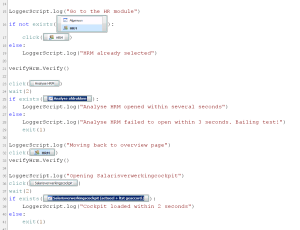
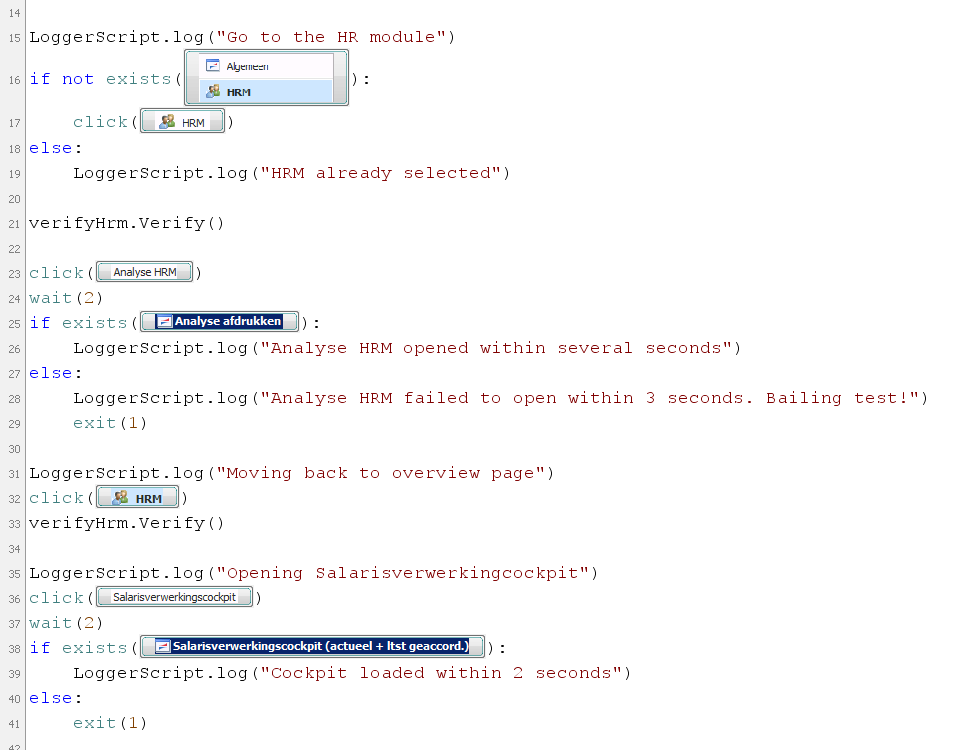
Sikuli-Code-SnippetThe first thing I disliked a lot is that Sikuli is 100% depending on Java 6, try running it on 7 and you have a problem (as in, it simply doesn’t work).

Another bad part of Sikuli is that even if I wanted to, I cannot add Object ID’s. This means that if I want to verify the existence of something, it needs to be done with screencaps and recognition thereof. Which leads me to the ugly. Screencaps are not the nicest way to identify objects, in fact they are ugly and not friendly to use, since objects can occur, in a similar look and feel, several times on one screen. This results so now and again in the wrong button being clicked. It may look the same to Sikuli, but it is not the same functionally.

On top of that, I am now saving images in source-control (GIT) which I am not in favor of. Why would I want binary files in source control? I cannot do a diff on them anyway.

SilkTest Borland logo

I have known Borland as a company for a long time yet in the past 10 years have not really worked with any of their tools. A short summary of how they see themselves:

With Silk Test, there’s no need to understand coding so even non-technical people like your business analysts can build tests and get fully involved. This 13.5 release also breaks new ground by working with all the latest browsers, so a single script is all you need.

Well, there are some issues with that statement of course, cause a single script is always doomed to fail in the most horrid ways imaginable, but still, SilkTest is a nice tool to work with.

The good

The reason for looking at SilkTest was because I would like to have a tool now which is future proof for the organisatio. In other words, will this tool support further test automation on the end-to-end chains within this large organisation. One really important qualifier for that is solid SAP support. My Proof of concept on SilkTest started off looking into SAP support. The way Silk handles SAP I can simply summarize with one word: good. Out of the box it managed to select the correct SAP instance from the system selection popup, login without issues and after a few attempts execute a bunch of transactions. In other words, I was happily surprised! Most test automation applications I had on the longlist have serious issues in dealing with SAP.

The bad and the ugly
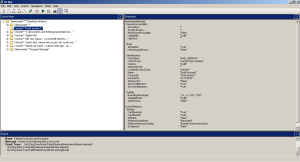
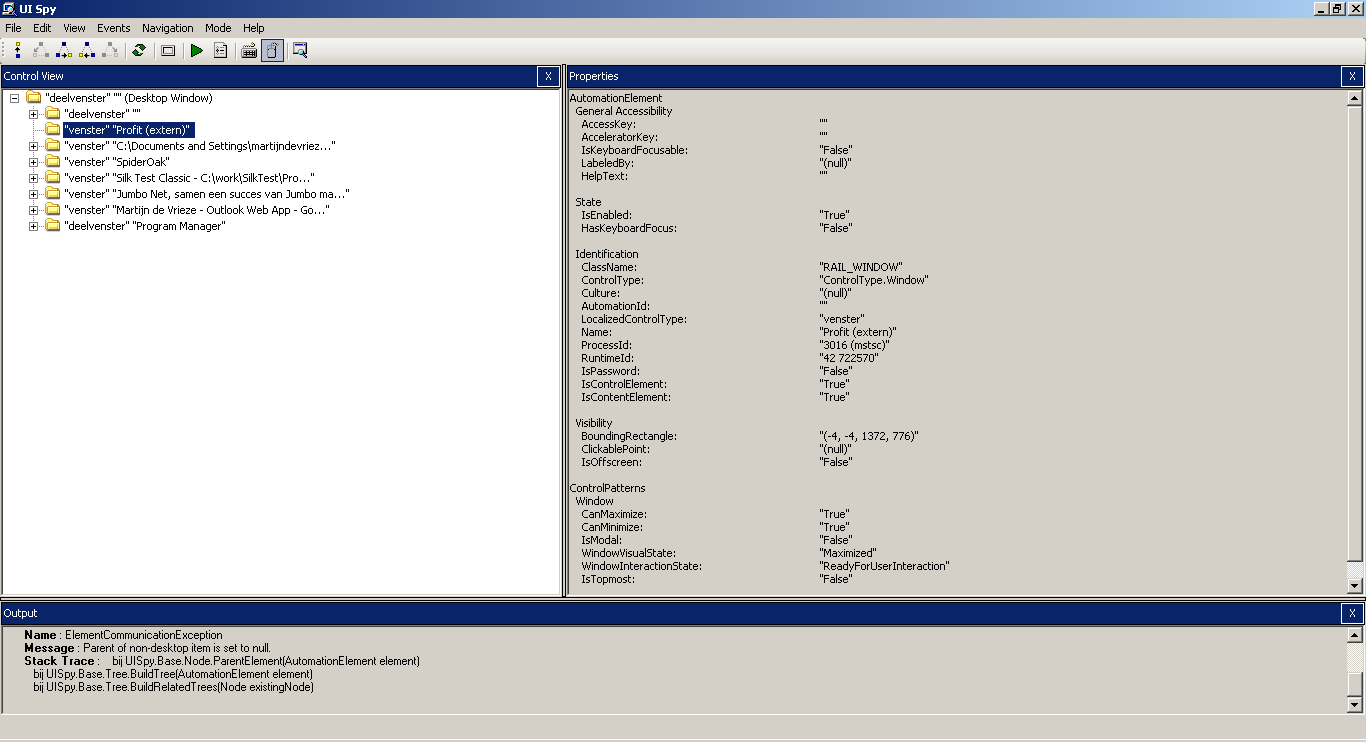
UISpy view of the applicationThe not so nice side of SilkTest in my opinion is that the recorded code is somewhat ugly, if not really ugly and not very friendly to read and through that probably also to maintain. This however is just a minor nuisance compared to the next issue.

Since the application under test is being served through an RDP tunnel I have no access to the object ID’s. In other words, it is difficult to recognize objects on the application. In SilkTest it is not merely difficult, it is close to impossible. The only runnable way to do so I found is to record the tests based on the screen coordinates and then manually add assertions all over the place. However since SilkTest doesn’t see what it is trying to test, getting the assertions in is really hard. What do you put the assertion on? There is no object to verify.

In other words, this is a disqualifier for SilkTest in this context.

Selecting performance test tooling – Part 2

In my first installment I wrote about how I got the requirements together. Based on those I wrote a plan on what will need to be done. In my second installment I wrote about the first considerations of what I need the tooling to be able to do. In this part I am going to discuss a few of the things I have done to come to the shortlist and what will I do as a Proof of Concept for the tools.

Load generator

First of all, let’s get the easy part out of the way. We will need something to generate a (functional) load on the servers. That part i consider relatively easy, no big tools are needed for this since we have an extremely powerful opensource tool at our fingertips: Apache’s JMeter. JMeter The load will have to be generated based on both HTTP traffic and client/server traffic, neither of which should pose a problem for JMeter. The most difficult part for load generation is getting the numbers out of the system, e.g. figuring out what the average and peak load is on the system. For this we have thrown some lines out to application managers to figure out.



Long list

The longlist I started out with was not just any list, it was a set of several lists. Out of this initial set I picked a bunch to actually play around with a bit more. Some gave me fun new insights, some disappointed me from the beginning, just by reading the sites or white papers.

The list of tools I initially looked at somewhat seriously was the following:

telerik-logo

Logo_froglogic

SmartBear-New-Logo_RBG

header-logo-borland

1350141391

Original_Software_logo

autoit-logo

thoughtworks-logo

logo-neotys-top


Shortlist

Quite a few of the tools I installed, just to see how they work and integrate with developer tools like Eclipse and Microsoft Visual Studio Express. The majority of the more expensive tools barely integrate at all, since I would need to have a full version of Visual Studio rather than the Express version. That is a full disqualifier for me in this phase.

Another strong disqualifier is if the tool simply refuses to run on a Windows XP Professional environment, such as Microsoft Visual Studio Test Professional. Within this company the majority of machines are still running Windows XP or XP Pro, so the tools need to work perfectly in that environment. Interestingly the only tool that flat-out refuses to be installed on it is a Microsoft own tool :).

After having considered the needs for the tool in the short term and possibly longer run two tools jumped out big time: Borland SilkTest and Sikuli.

What have been (some of) the disqualifiers for the other tools I looked at:

  • availability of a downloadable and fully usable demo version, some tools have no demo version available or the demo is locked off.
  • support of SAP for possible future use, the organisation is looking at a long road ahead of SAP upgrades and patches, so automated test support would be a welcome helping hand
  • possibility to use the tool for more than just performance or load testing, for example for pure functional test automation
  • organizational fit moving forward, e.g.
    • will the less technical people within the organisation be capable of using this tool for future runs of the tests built for this particular project?
    • will this tool be capable of supporting upcoming projects in both functional and non-functional tests?
    • is the learning curve for the internal users not too steep (or, how much programming is actually needed)
  • price, is the price something that fits within the project budget and does the price make sense in relation to the project and capabilities of the tool

PoC

With this very short list of two tools a Proof of Concept will be made to see how the applications deal with several situations I will be running into during the performance tests.

One of the main parts to test is whether or not the tool is accurate enough in measuring and reading the state of the application under test. Since the application under test is two fold: a web-application and a remote desktop application.

The webapplication, as stated in the previous post, will not really be the difficult one to test. The remote desktop application however is more challenging to test. The application runs on a Citrix server and thus the object ID’s are not visible to the test automation tooling. The second  outcome of the PoC should be to see how well the tooling deals with the lack of object ID’s and thus with navigating the application based on other pointers. For Sikuli the challenge will be different resolutions, for SilkTest I will be focusing on finding a way other than navigating by screen coordinates.

What’s in a name? The job title paradox

Test consultant

As a test consultant I get hired in lots of different environments and companies, which results in all kinds of interesting job titles I receive. This led me to start thinking about what the title of a job actually means and what the difference is between them. Why should I be a QA Engineer, Test engineer, technical tester, test automation developer, load tester, developing qa engineer or whatever else people can come up with. And why should I care what they call me, as long as I get to do my job and I do it well?

What is the difference between them, why would you call yourself a technical tester or a test automation developer or a test automation engineer for that matter?

Test professional

Within our company we are currently expanding the group of “professionals who are very capable in test automation or load and performance testing”, this raises the question so now and again of what to put on a business card, or an email signature.

Then today I read this (long) article on Harvard Business Review which sounds completely logical, I too in the past have often looked at what the title was on a resume before even reading what the job itself entailed.  At one of my past customers a group of people had the title “test managers” and instead of doing the traditional job of a test manager they were fully dedicated to executing product risk analysis and based on that give advice to other groups within the organisation. At some point during my assignment there, they started a search for a new “test manager” and found they had incredible issues finding someone who matched the job, since all applicants applied to the title rather than the job description. Those who did apply to the job description seemed to lack the “test manager” type role in their resume and thus were not interviewed. It took the company a while to realize this gap and change the name of the role to something more clearly descriptive of what the people in this group did “test risk managers”.

What the above story illustrates to me is that a job title should be descriptive of what you do, not what you want people to think you do.

Interlude

A former colleague of mine recently received a promotion to something like Senior Vice President of something or other. I am very happy for him that he has a new title, however the job he does is still exactly the same as the one he did 2 years ago: he manages a group of developers and testers. So why not just call yourself that?

Performance tester

In my current assignment I have had several different roles, one being Test Coordinator, which effectively meant I was indeed coordinating the different parties involved with the tests to be executed. However when I switched to a different project within this organisation I started working fully on load and performance testing. The test manager raised the question on what my title should be and I proposed to adjust it to exactly state what I am doing for them at the moment: performance tester.

Getting back to the opening of this post, it is never really clear to me what the difference effectively is between a tester, a test engineer or a QA engineer. In the end, in my experience at least, they all do the same thing: they test software. So why not just call yourself a Software Tester? This makes it abundantly clear to potential colleagues and employers what you do for a living, it is a clear description for recruiters to find a person on and not send some highly inappropriate job offer (which they no doubt will still be doing cause they generally don’t read resume’s of people they contact). And most importantly, it clearly states what you are doing and thus helps you with a direct reality check whether the job you should be doing according to your title is indeed the job you are doing.

My point

So my view on job titles seems clear: just make it state what you do, what your charter within the organisation is and try to keep it clear, short and simple. This makes your life easier as well as that of your colleagues!

Selecting performance test tooling – Part 1

How do you come to a logical and effective performance test tool set? Yes, I say tool set since quite often just one tool will not suffice.

As could be read in my previous post I am currently heavily involved in performance testing for a large Dutch retail organization which is merging two large organisations into one. For the ERP system they both use I have written a concise Performance testplan. Now the time to execute has come.

In order to execute the performance tests on the ERP system, which is both desktop application (WPF) and web-based I will need a solid tool to

  1. generate load on the servers by emulating functional  behaviours
  2. functionally walk through the actual desktop and web-applications to measure the true application performance
Performance testing

Performance testing

Generating load is not the biggest challenge, quite a few tools are capable of doing that, especially since there is a website we can push the load through. The functional walk-through is going to be a bit less simple to create, especially since I have to recreate the same scenarios twice; once for the web application and once for the desktop application.

To complicate things even more, I want the functional walk-through  and thus the real measurements, to be done by the same tool. This way I can make sure the measurements are reporting on the same thing in the same way and thus can be compared to one-another to some extent.

Long list

First off in looking for the right tools I started setting up a long list, or actually, I Googled for a longlist…
This search resulted in several useful pages I checked out:

Just based on previous experience, tool knowledge etc. I dismissed a set of the tools and ended up with a nice set of  possible tools.
Next step, which of these tools actually fit with the organisation and application landscape? I have specific needs at the moment for this tool, however I also need to keep the future needs of my customer in mind. In other words, I need a tool that is a) good for me now and b) good enough for the foreseeable future to be worth the investment (in license and time or just time, either way quite an investment).

What will the tool need to support?

  • WPF/Win32/WinForms
  • Java (Swing) UI’s
  • Oracle
  • SAP GUI
  • Web applications of all sizes and shapes
  • RFC communications
  • SOAP
  • Tibco

The search has begun.
In the next installment of this series I will tell more about what the shortlist has become, what I tested on the applications and how I have come to a decision which application seems the best fit for this environment.