JMeter and remote servers – a tutorial

In my previous post I discussed why you might want to run your own servers for load & performance testing. In this article I will elaborate a bit on how to setup your machines. The Apache Jmeter pages of course have an explanation on how to setup remote tests. What I have heard from colleagues and what I experienced myself, is that that explanation is not always as clear and concise as may be preferred. This is my attempt at giving a readable explanation on how to setup JMeter with remote instances.

Some basic terminology

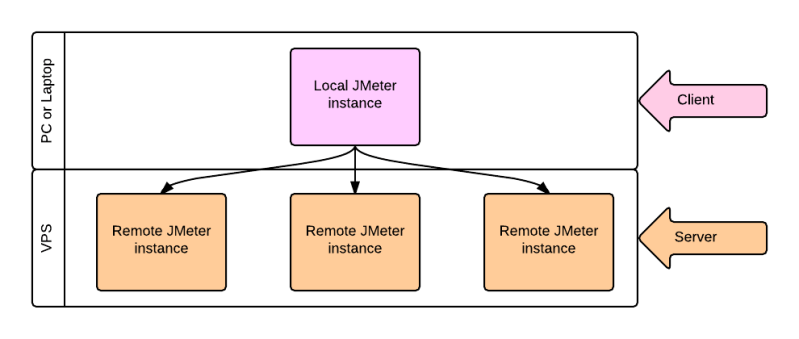
I will use the terms Local and Remote to identify the different sides of the configuration needed to get things working.

  • Local is to be read as your workstation, e.g. the machine you use to build your JMeter scripts.
  • Remote should be considered any machine that will be running a (headless) JMeter instance and will help generate load on an object.

jmeter Client - Service image

How to setup JMeter locally to work with remote machines

Continue reading

JMeter – private remote servers or a service?

Over the past year I have spent a lot of time in close collaboration with Apache JMeter. I used JMeter as a standalone platform, in collaboration with several tools out there and with my own servers. Over the next few posts I will elaborate a bit more on what I have learned from working with tools like BlazeMeter, Loadosophia as well as working with your own remote servers and Jmeter. On top of that I will share some things I consider good practices to use when working with JMeter and building elaborate test scenarios in it.

JMeter and remote servers

Apache JMeterJMeter is great as a stand-alone load generator, however the moment you need to generate a substantial load or a distributed load, you will require the use of more servers. There are several possibilities to add external servers to JMeter. You can use a loadgeneration platform such as BlazeMeter and Flood.io or you can choose to use your own machines (Disclaimer: I have only worked with Flood and BlazeMeter as services, so I only mention these two. There may very well be other services out there I am not (yet) aware of).

Why use your own remote servers?

Virtual Private ServerAlthough there are several commercial options to run JMeter tests from a cloud-platform, it might be useful to have your own servers running. Your own machines, for example Virtual Private Servers, will give you at least the following advantages, please bear in mind these are the main reasons for me to run private servers. It may very well be that you have different reasons for doing the same (I’d be happy to hear them btw!):

  • Availability within firewalls: Not all applications are available outside of firewalls. For quite a lot of companies it is not an option to allow external addresses, especially cloud services, within their firewalled environment. When this is the case in your organisation it can be very useful to have your own load generator hosted inside the firewall.
  • Geographical location: not each and every country has platforms available for load generation. Although platforms like Blazemeter have a lot of different locations available, it may very well be that your particular country is not available through a serviceprovider. However getting your own, hosted, machines within a country is generally not too difficult to do. Keep in mind though whenever you want to use something like a Virtual Private Server to verify with the hosting company whether they allow load generation from within their network!
  • Control: a fairly straightforward reason is in order for you to have full, unlimited control over the load generating servers. If you have your own (virtual) servers running you can easily adjust settings, properties and other things in order to make it fully match your (customers) needs.

Why use a service?

BlazeMeterflood.io

Even though there are quite some reasons for using your own machines, the advantages of using a service like BlazeMeter or Flood.io  are plenty, I will just highlight the few that for me have tipped the scales several times in favor of a service.

  • Maintenance: Setting up your own servers is time consuming and therefore not cheap. These servers need maintenance even though you quite likely do not constantly need them. A Service is just there. You buy a subscription, be it with a time constraint (monthly) or a load constraint (max amount of concurrent users) or something like that, but the service is simply at your fingertips. The moment you need it, you have it.
  • Multiple locations: the JMeter based services generally make use of the Amazon AWS cloud, thus giving you, the user, an immense amount of servers at your disposal. With this comes a huge worldwide distribution, which can be very advantageous for big world-wide used applications.
  • Support: both mentioned platforms have a very solid support base for their customers. If you have questions, if your tests seem to not run properly or you simply have issues getting something done, there generally is a good support platform available. You can use forums or the actual helpdesk, but either way, there is a good, solid, commercial support-base to help resolve your issues.

In the end, I choose per assignment what best fits my needs. Sometimes I use the VPS, sometimes I use a service. It is important you at least think about what best suits your needs for the test you are about to build and execute.

Reusable components in JMeter

Why do I need reusable components in a load script?

Ok, so generally speaking a load script may not really need reusable components you think. However there are plenty of reasons to actually use them and use them effectively, efficiently and heavily.

First of all, not all Jmeter load scripts are for a one off effort. There are quite some times that, if not entire scripts, then at least part of a script could be extremely useful to reuse. Think of a nice application, such as a webshop, you may be trying to stress out with Jmeter. While building it I hope the developers were thinking of reuse, so why wouldn’t you while building a script to stress that shop out?

Secondly, when building load scenarios, you may want to reuse a search function, a registration function, a login function, etc. So why not make a bunch of reusable modules or JMX scripts that help you build scenarios by just clicking existing things together rapidly rather than reinvent the wheel over and over for each and every scenario.

I am not even going to mention the default reasoning: standard practice of DRY: Don’t Repeat Yourself! (ok, there, I did it anyway)

Does JMeter allow for it?

Well, that one seems a bit obvious, since I am writing about it here of course 🙂 Yes Jmeter has a wonderful way of dealing with reuse:

All you need is a Module Controller

Jmeter 2.13 Module Controller

or an Include Controller (which I will write a brief how-to about in a followup post):

Jmeter 2.13 Include Controller

Jmeter 2.13 Include Controller

These two can basically do a similar thing, you can reuse either a module or reuse, and by reuse I mean include of course) a complete testplan in a test. The actual working and thus their use and usefullness is quite different though.

The Module Controller keeps everything within one testplan, whereas the Include Controller expects you to have several (at least 2) testplans to use and work with.

How do I use them

Module Controller

The Module Controller is a relatively easy one to explain as the first one. I use this method often when building scenarios which are relatively close to each other, for example for a webshop. The example I am going through below is a very simple basic one. Sticking to a basic description, since I mainly wanted to show that it is possible to use reusable components and how you can do it.
Imagine a few scenarios for a webshop:

Scenario 1:

  1. Create account
  2. While logged in browse the webshop
  3. Add items to your shopping cart
  4. Go through Checkout
  5. Log out of webshop

Scenario 2:

  1. Browse to the webshop
  2. Add items to your shopping cart
  3. Go to Checkout
  4. Create account on Checkout
  5. Go through checkout
  6. Log out of webshop

Scenario 3:

  1. Browse to the webshop
  2. Sign in to the webshop with an account with at least 1 purchase
  3. Do something the My Account
  4. Add items to shopping basket and leave them there
  5. Log Off

In these scenarios there are several steps that are repeated: Sign up for an account, log off, add some items to a basket. If you want to make sure you do not need to maintain these steps at different spots in your script, it make perfect sense to make these steps reusable. This is after all what you would do with test automation as well, right? Let’s do just that!

What do you need in Jmeter:

Testplan
 > <DISABLED>Threadgroup
    > Simple Controller with Signup steps
        > Samplers etc needed to run through the signup flow
    > Simple Controller with LogOff steps
</DISABLED>
  > Threadgroup
    > Module Controller - In this controller you can choose which controller you want to use. Select the Signup Controller
    > Simple Controller
        > Samplers etc. needed to execute the following steps

Your JMX could now look something like this:

JmeterModuleController

Include Controller


This will be coming along in a followup post at a later time.
How did teaching test automation work out?

A while ago I wrote a post about a set of workshops I was asked to setup for functional testers, test coordinators and test managers to get the familiar and acquainted with testautomation and performance testing. I pre-selected a set of tools which I wanted to go through with the participants. The slides I used for this can be found on SlideShare:


Apologies for the slides being in Dutch. Possibly I will come up with the EN version as well, however the training was in Dutch.

This part of the evening already created a lot of discussion and questions. One of the nicest questions was the obvious one: “is coding really needed when working on test automation? I thought test automation tools and software were advanced enough nowadays to no longer require code to work well?” This questions fairly obvious, considering the tools I selected for the training, Sikuli and AutoIt SciTE. Both tools require a lot of coding in order for them to be at all usable.

The hands-on experiences

After we had had the theoretical bits we moved on to the hands on bit. As visible on the last slide there were a few (simple) assignments prepared for the participants. The first one was executing a calculation with the Microsoft built-in calculator. Fairly straight forward and rudimentary I thought. A few had prior coding knowledge so they went to do this exercise with AutoIt rather than with Sikuli, the majority of the group however attempted to execute this task with Sikuli.

Sikuli

Since Sikuli is mainly image based almost everyone started by actually clicking on the START button and going through the Windows Start Menu. After a while I thought it worth while to show the group how to just launch an application from within Sikuli through the RUN command of Windows. This of course immediately raised the question why I would prefer to do that over manipulating the mouse (which is answered simply by explaining the concept of cross-platform (or at least cross windows version) testing with test automation, the <WIN>+R key-combo has been in existence since Windows 95 if I recall correctly and thus this is backwards compatible and since you can still use this within Windows 8.1 it is also forwards compatible).

Sikuli turned out to be a hit with the participants. They barely noticed they were actually writing code and at some point I saw a fairly experienced test-manager explain some basic things of Python coding to at least two other test-managers. Non of these had prior coding experiences, not even the one explaining things.

AutoIt

AutoIt, with full access and use of the Windows API however was a bit more of a stretch. Turns out the Basic based language for AutoIt is for non-coding testers a lot more difficult to understand than Python. The first assignment, manipulating the Windows Calculator, was for most still doable, although it took a lot more explaining and showing than Sikuli.

The second assignment, calculating the square root of a number in Excel proved for most really difficult. I had hoped they would see the use of the Windows API and thus also come up with using the Office API in doing this, but apparently I overestimated the ease of use of AutoIt for them.

My takeaways

Next time I do an evening like this I now know to introduce AutoIt separately, after people have gained some experience with Sikuli. Guiding them a bit more with the AutoIt things, instead of letting them go.
Overall the test automation evening was really great and I do believe everyone had great fun and actually got a bit of an idea of what it is that attracts me to testautomation.

2013 in review

The WordPress.com stats helper monkeys prepared a 2013 annual report for this blog.

Here’s an excerpt:

The concert hall at the Sydney Opera House holds 2,700 people. This blog was viewed about 10,000 times in 2013. If it were a concert at Sydney Opera House, it would take about 4 sold-out performances for that many people to see it.

Click here to see the complete report.