The difference for test automation between cutting edge and legacy software

Within one of the LinkedIn groups (sorry, you need to be a member of the “QA Automation Architect” group to be able to read it fully) we started talking about the difference the state of project or product can make for test automation. In this post I will make a distinction between 2 states: new where no code has been written yet and existing  where application code has been written, but no test automation has been implemented.

Cutting edge

New So when creating a totally new product, life for the testers can be made easier by design, that at least is the thought. This does imply that testers, and not just the “manual” testers but all testers, including automation testers if these are a separate breed as some people seem to think, need to actively participate in the requirements phase of a product. With actively participating I do not mean to imply that they are normally not participating, I mean they need to look a bit further than just at what to test, is it testable etc.

They should also use their insights and ideas to help both product owners and software developers to understand what are the things that might make life easier for testing this new product.

When for example building a new web application, they might consider adding a simple REST api to the application, which in production can be closed off based on IP or firewall rules or something like that. A simple REST-API will make life a lot easier when creating your automated tests.

Another thing to make life easy might be ensuring clear and logical naming conventions to be used for all page object in order for the automation to use the Page-Object-Model. Not only is using solid naming conventions good for automation, it also makes maintenance on the application itself easier, since all objects are identifiable by their unique ID.

Legacy

How is existing code different from non-existent, other than that one is already in production and the other has to be created? As far as test automation is concerned, especially when talking about legacy software, it may turn out to be a lot more difficult to find proper hooks into the application for solid automation other than on the labels of buttons or fields.

When you have a fairly recent application it may be a website or a desktop app, both have the possibility that there are some sorts of ID’s for all objects. However when talking about true legacy software, such as 15 year old Delphi, it is quite unlikely the developers used WinForms, Win32 or SWT. Not having hooks like that into the application can result in having to scrape the UI for object labels, which is fine when testing one particular language, but if your software was localized things can get even more complicated.

Getting consensus within the technology group about new software is one thing, getting a “non-functional”, non-business related change about in existing software however is a whole different thing.

As long as the code is still “alive”, e.g. new features are still being added, bugs are being fixed and in general there are still developers working on the application, there is hope of getting some more “automatability” in the code.

First of all, while fixing bugs old code is touched, adjusted and retested, this is always an opening to talk to the developers resolving the issue about adding a small bit of extra “sauce” to make it easier to add this particular thing to the automated testing suite to ensure chances of recurrence are minimized, of course by fixing the bug you hope to completely obliterate this particular issue but it might cause new damage elsewhere in the application. So while talking to the developer about this function, try to convince him/her that adding a bit of extra to test not only for the fix of this issue, but also to verify the surrounding features.

While new features are added, this can be treated as “new code”, as long as you manage to get agreement on adding identifiers or a separate layer in these features to make test automation at least easier. If you achieve this, you are quite close to closing the majority of the gap. Refactoring is an excellent opportunity to again make minor changes in the application enabling test automation at a different level.

How do you get “automatability” in your specs?

Assuming you want to get your  product easy to automate and thus want to make sure it is thought through, how to get it in the specifications? And more importantly, how do you get it in there without adding things like:

  • unnecessary workload
  • unneeded and unwanted features
  • potential security holes
  • un-maintained code

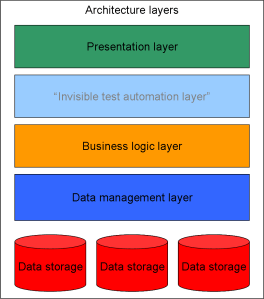
Enterprise Architecture Layers with a "hidden test automation layer"One of the ways to go about it is by, in collaboration with the developers, enforcing a coding standard in which you ensure all objects receive an ID. Regardless of whether it is desktop or web based, most automation tools are looking for a hook into the UI, if there is one, and one of the nicest ways of doing that is simply by using the ID.

Alternatively you can have a “layer” put right underneath the UI, ensuring you can bypass the cumbersome UI while automating your tests. One of the issues with this option however, can be that you add “hidden” code which gets forgotten easily. It also is a potential risk for the security of your application, since you basically enable a man-in-the-middle hole.

If this path is taken, ensure that this “feature” does not end up being an opening for malicious code to reach your data. A relatively safe solution for this would be to put some (extra) form of authentication in the layer.

There probably are more options you can investigate, the two I mention above are fairly harmless and yet can make life in test automation a lot easier and predictable.

In the end, no matter which way you go, as long as you get both developers and product owners on board in working towards a higher “automatability” of the code life for you as a test engineer could become a lot more fun.

I am not very impressed with theological arguments whatever they may be used to support. Such arguments have often been found unsatisfactory in the past.

Alan  Turing
Test automation in Agile and why it fails

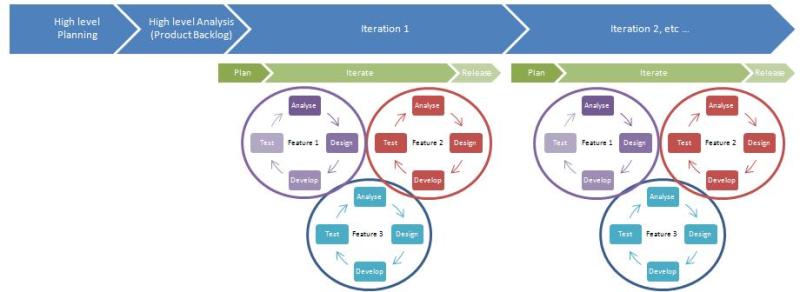
It’s fairly safe to say that quite a lot of test automation efforts fail. It is also very safe to say that without test automation an agile team fails. So how can you make sure that while doing agile your test automation will not fail and thus your agile team will not fail? One of the ways to answer this question is by looking at why test automation often fails within agile environments.

When I am talking about test automation within this post, I am referring to testing that is done to reduce the amount of manual regression work, the so called functional test automation or automatic regression testing.

Moving target

Test automation quite often does not receive the attention it needs and deserves, also in agile teams. Quite some test automation efforts start off too late and without the appropriate preparation, resulting in organic test automation driven by a moving target. The moving target is the system under test which, in agile, is constantly in flux. Each sprint new features are added, bugs are fixed and quite often it is not clear at the start of a project where it is going to end up. Writing automated scripts against such a flexible environment which will stand the test of time, is difficult. It is even more difficult when the base on which automation is done is weak.

Quite often test automation runs behind on what is being delivered within an iteration, this is somewhat logical, considering that it is difficult to test, let alone automatically test what has not been built yet. Ideally while manually testing the new feature(s) as a tester, you’re already pondering how to automate it so that you do not have to do the tedious work more than once. Given enough time within your iteration, you actually might be able to automate some of the features, from what I have seen thus far, generally not all features will be covered in test automation within one iteration. So if these tests are not all automated, what happens to them in the next iteration? Are they omitted? Are they picked up and automated retrospectively?

If you do not keep track of what has been automated during an iteration for both your current iteration and your previous iteration, how can you rely on your test automation? You can’t be sure what exactly it is going through, so a bug can easily get through the net of your automated tests.

This moving target you are testing needs to be traced and tested solidly, repeatedly and in a trust-worthy way!

Definition of Done

In the majority of the DoD’s I have seen, one of the items is something referring to “tests automated”. The thing I have thus far not seen however, is the team adding as much value to the automation code as they do to the production code. Quite a lot of DoD’s refer to certain coding standards, however these standards often seem to not apply to functional test automation. Isn’t your functional automation code also just code? If so, why then should this not be covered in code reviews, be written according to some useful guidelines and standards and hopefully use a framework to make the code sustainable?

Test automation is just writing code

I have seen several automation efforts going on within agile teams where test automation was done without proper thinking having been put into it. A tool was chosen, based on what exactly other than members of the team having heard of it or having had good experiences with the tool. No base or framework to keep the code clean chosen. Since you are writing code, you should follow the same rules as the rest of the software developers. Don’t think your code, since they are merely tests, should not be hooked up to some form of framework. If you want to make your tests survive a few iterations, considering reuse of your code would be logical.

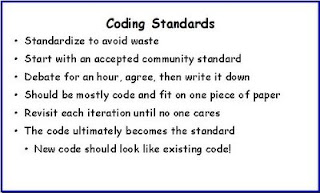
By the way, coding standards do not need to be too complicated. In 2009 “Agile in a flash” came up with a coding standard that could work for all languages and for most environments:

Coding Standards - agileinaflash.blogspot.com

All of the above mentioned points are “logical” when writing an application which is supposed to go into production. However when looking at a lot of (agile) projects, these logical “best practices” seem to be totally forgotten when it comes to test automation.

Succeed in test automation

So, how do you succeed in your test automation? How do you make it work? The answer seems clear to me: test automation is not like writing code, it is equal to writing code. Since it is the same, treat it the same way!

Do your code reviews, follow a form of a standard, use a (simple) framework to make life easier in writing tests, create reusable modules in your automation code. In other words, treat your functional test automation with the same respect as your production grade code. Who knows, you might want to run your tests against your production environment some day! In setting up your initial test automation environment and framework, don’t be shy and ask the developers in your team for tips, tricks and suggestions. They quite likely have gone through those setup steps more often than you have, so use their knowledge. Asking them for their insights and ideas not only helps you, it also helps them feel more responsible for doing their 5 pennies worth on the test automation side. They will get a clearer idea of what you intend to achieve, so they might also be more willing to help out keeping their code testable, they might even enjoy helping you write the testscripts!

Resources

Some informational resources where you can find some ideas on how to setup the test automation framework:

Test automation metrics – mashing up non-test data

In my previous post I wrote about reporting on test automation and one of the main things I said in there was: use the vast amount of data you have. In this post I will elaborate a bit more on that, in fact, I am going to go one step beyond and say: don’t just use your own data! Generally in an organisation there is more data at hand than just the data you create with test automation. Some very powerful pieces of data are release-boards and bug-metrics.

Bug metrics

The bug-metrics are quite often a logical item to look at. However, keep in mind that generally speaking, test automation will not have a very high bug-detection-percentage. The bug-detection-percentage curiously enough is something you do not often read about, but it is being measured all over the place actively; it is the amount of bugs found in production set off as a percentage of the amount of bug found before production and in production, in other words: Bug Detection Percentage calculation An example of a BDP graph, with Preproduction found bugs, bugs found in production and the grand total of bugs found per run (please keep in mind, this is simply sample data and not from an actual project) Bug detection percentage graph The problem I see in using the BDP to show the effectiveness of test automation is that the objective of test automation is generally notto find new bugs, but instead to ensure all existing functionality, on a new release, functions as expected and thus as it was on previous builds or releases. So in short, test automation is excellent at running a regression test, but not at finding new problems. Of course it’s possible to then see if you can define a bug detection percentage for test automation specifically, e.g. make the numbers solely based on test automation. This however will not really give any insights into the effectiveness of test automation considering the  low amount of bugs found by test automation in general. What can we do with bug data and test automation? Frankly, I am convinced that generally speaking test automation will not benefit from setting metrics based on bugs. Use other data instead, such as new features introduced, lines of code changed, number of tasks or user stories completed and set that off against your test set showing growth.

Test automation and User Stories

In agile environments it is generally considered (and thankfully so) a good thing to automate the crap out of everything being built. Generally there is quite some data available on the amount of stories or tasks coming out of a sprint, or on the story-points having been committed to per sprint. A graph setting off the story-points (or complexity points if you will) against the amount of tests having been automated can give a nice insight into the “coverage” of your automation. Add to this set the amount of bugs appearing in production and you have a sweet showcase of how your agile effort is performing over all. Storypoints vs automated tests vs production issuesA graph like this contains a lot of information so it will need a bit of explanation when showing to the team and especially to managers. On a per sprint basis this graph shows:

  • Blue bars: the amount of story points delivered per sprint (the actual delivery, not the committed amount!) set off against the left vertical axis
  • White bars: the cumulative amount of automated tests run on these stories and run as regression set off against the right vertical axis.
  • Black line: a trend line of the overall amount of automated tests
  • Green line: the actual amount of production issue occurences after releasing a sprint worth of code to production.

A graph like this is relatively easy to setup and maintain and it will show a very strong picture. It clearly shows the progress of the team effort (growing amount of story points taken up, less production issues over time) and at the same time gives a very clear insight into the added value of test automation within the team by showing the rising coverage against the declining production issues.

Test automation metrics – what do you report on?

Metrics

One of the fun things of test automation is that, since you do not have to do all the tests manually, you can spend some extra time coming up with test metrics. Test metrics are tricky to do well in any situation, but in a situation where there is an abundance of metrics, such as in a test automation setup,  the choice of metrics becomes the key first step. What are the metrics to look at? Code coverage? Number of tests passed vs Number of tests failed? Duration of the tests over time? Number passed now vs number passed in previous runs? Newly automated tests added since last run? You can keep going in dreaming up new metrics, but which ones will actually make sense and become representative?? And of course, how do you ensure you do not spend ages ploughing through your data to gather these metrics manually?
Borrowed the image from khanmjk If you just take a test automation tool off the shelf it probably has an immense amount of options to measure on and report on, but the risk is always that you start generating reports and metrics that are not quite representative, or even worse, give a tainted view of the actual situation. So how do you make sure you don’t end up with a jungle of metrics?

Audience

First thing you need to know is who is the audience of your metrics? There is a huge difference in what different levels in an organisation consider useful metrics. One manager can be mainly interested in the time spent automating versus the time won by automating; e.g. the extra time now available for testing other stuff, the stuff that matters, while a test manager might be more interested in the functional areas of the application covered and to what extend they are covered.

Type of metrics

I will not attempt to dream up the perfect metric, for every environment and situation one metric might be better than the other. It all depends on the context, the persons you are reporting to, targets of each particular business area etc.

What I do want to touch upon is the awesome power you have with metrics coming out of automation. Since your tests can run rapidly and often, there are lots of runs that can be measured. In other words, you can gather a lot of data, a lot of historical data. When reporting on metrics like amount of tests passed versus the amount failed, it generally will be a snapshot of some test run. Why limit the metric to a snapshot when you have living data at hand?

The strongest metric to show to any manager is trend lines; you need to report on the amount of tests passed vs failed or the amount of tests added to the automation suite? Need to report metrics on code coverage? All of these metrics can result in a trend line. Show the “upwards trend” and managers are generally happy without even knowing what they are looking at.

There are of course some pitfalls, the main one I have made was having a downwards sloping trend line. That seems like a bad trend, even though it can be a totally perfect trend, the sight of a trend line going down generally makes managers nervous, they expect things to always go up.

Be prepared to explain a downwards trend, cause sometimes you cannot escape a downwards or flattening trend line!

Graph examples

Below are two graphs, both with the same data, and a trend line set on the same data. The three charts however, when looking at them each tell you a slightly different story due to the style of trend line chosen for the chart.

Upwards trend

Making the numbers seem a bit more positive than they really are by using an exponential trend line.

The exponential trend line paints a strong picture, however when using it, be prepared to explain the fact that despite the lack of growth at about two thirds of the graph, the trend is still upwards. This is a difficult story to tell.

Linear trendline

The linear trend line gives an indication of the overall trend, when close to flat-lining you know you have a problem, when it is too steep however you also may have a problem!

The linear trend line is one usually understood well by most people, at least in my experience. It shows the gradual, overall progress being made on your metrics. Since it is a straight line, quite often questions about what happened in a “dip” period can be prevented.

Since there is an abundance in data, if you have setup your automation properly, there is also the possibility to combine data. Such as setting off the trend of passed/failed to the trend of new tests added, or even more interestingly, to new functionality added to the system under test.

Be aware!

One big warning though, when playing around with the numbers you may be tempted to make them look nicer than they are or focus on the good things. However tempting this may be, don’t prettify your numbers or graphs, make sure the always paint a true story. If you manipulate the graphs, you are not only trying to fool your manager, but also yourself. Metrics should be useful for you as well as for the managers.

In a follow up post I am currently working on I will give some more clear examples of mashing up data into a useful automation report and how to interpret/present the data given specific contexts.

Figures often beguile me, particularly when I have the arranging of them myself; in which case the remark attributed to Disraeli would often apply with justice and force: “There are three kinds of lies: lies, damned lies and statistics.”
– Mark Twain’s Own Autobiography: The Chapters from the North American Review

–Edit–

A follow up on this post can be found here: Test automation metrics – mashing up non-test data

How do you test for SEO

In this post I mention SEO and Search engine optimization several times, I am referring here to the optimization of a website for natural search, so without paying for it showing up high in the search result lists.

While on holiday I spent some time talking to a local entrepeneur. He makes his money through his own website, we got to talking about his website and about the translations of his site in particular. Since this site was translated from Greek into English, French, German, Italian and Russian I had a quick hunch that his meta-keywords would not be in order for all the separate languages (which does not apply to all translations he made by the way).

When asked to test a site specifically for SEO, what are the things to look at? As I mentioned above, there are a few tell-tales when you start your testing, especially when the site has been translated:

  • lang – this should be set to the actual language of the page you are testing
  • meta-keywords – these should be in the same language as the lang set in the header
  • meta-description – this should be in the same language as the lang set in the header
  • Alt-text for images –  – these should be in the same language as the lang set in the header
  • page specific URL’s – should be in the same language as the lang set in the header

Please note that this is just a sub-set of what needs to be looked at when testing a site for SEO optimization.

Based on the before mentioned website I will give some examples of what to look for when testing for search engine optimizations.

HEADER

Looking at the header of the Russian version I indeed saw exactly what I assumed I would see:

<html xmlns="http://www.w3.org/1999/xhtml" xml:lang="ru-ru" lang="ru-ru" >
<head>
<base href="http://www.corfu-villa.gr/ru.html" />
<meta http-equiv="content-type" content="text/html; charset=utf-8" />
<meta name="robots" content="index, follow" />
<meta name="keywords" content="corfu villa, villa corfu, seaside villa corfu, pool villa corfu, villa with sunset view corfu, villa rental corfu, corfu villa rentals" />
<meta name="description" content="Corfu villa. Two elegant seaside pool villas located in Chalikounas Corfu with amazing panoramic sunset view. See photos check 2010 availability and book online with our paypal secure system." />
<meta name="generator" content="" />
<title>Корфу Вилла | бассейн вилла с потрясающим видом на закат | villa.gr Корфу</title>

If you look fast and are not sure what to look at this looks fine, however from a Search Engine point of view this header is a bit of a drama.

The language is set to Russian in the first line, the title is in Russian, in the Cyrillic alphabet. The SEO issue however is in between the language declaration and the title: keywords and description are in English. When a Russian is trying to find a “seaside villa in Corfu” he will probably not use the English words for it, instead the keywords used will quite likely be “вилла на Корфу с видом на море“.

Just for fun, here are the result pages for the two searches; the English search on Google.ru and the Russian search on Google.ru. On the Cyrillic search the first page doesn’t have any links to our test site. On the English search however, the site is the first to surface, underneath the paid links. Problem I see with that result page however is, the url we get back is the main URL rather than the Russian URL.

The header of the homepage of the site is just the beginning of testing it for search engine optimization.

IMAGES

This being a site aimed at renting out a villa with amazing views in a fairly decadent location, it is quite visually driven. As a tester you might not pay too much attention to the images, however when testing the search engine optimization, the images should be looked at as well.

Sticking to the example of the Russian version of this site I grabbed another piece of the source code:

<div title="Corfu Villa Boxes" id="boxes">
<div title="Corfu Villa Gallery. Click to view more photos" id="left_box">
<div class="module">
<table border="0" cellspacing="0" cellpadding="0" width="100%">
<tbody>
<tr>
<td><a href="/ru/gallery.html"><img src="/templates/corfuvilla/images/gallery.jpg" border="0" alt="Corfu Villa Gallery" /></a></td>
</tr>
</tbody>
</table>
</div>
</div>
</div>

Within this snippet you’ll notice again an issue similar to that in the header meta-tags. The page is supposed to be in Russian, yet the title of the div is in English. The alt-tag of the image is also in English. Both of these are supposed to be in Russian in order for this page to properly be indexed by the search engines in that language. If you really want to make an effort, the image name should also be in Russian.

The useage of the images themselves, on the rendered HTML page already gave an indication that SEO and translation were not well thought through or at least not fully implemented.

Corfu villa gallery image

The text on the image should of course also have been translated. When, as a tester, you see mistakes like this on a website, this should quickly give you an idea that the SEO has not been done properly, nor quite likely will the translation of the site have been done properly. Ideally you would want the text on this image to be configurable in the CMS and be attached to the language the page is in.

Of course there are more things you have to look at when testing for SEO, however I will stop here for now.