Requirements for Load & Performance testing

In my current assignment I am now tasked with writing a performance test plan for testing the performance of an ERP system. In this case, with performance, I mean the actual user experience which needs to be measured. So how long does it take for a screen to be fully rendered within a desktop application for a certain user-type with specific authentication and authorization.

Test data

Considering the organization I am still working in at the moment, the test data will also be an interesting challenge  the requirements we have for data are fairly simple, at first glance at least:

  • 80.000 active users within the ERP
  • 150.000 inactive users within the ERP

However when we start looking at the specifics of how this data is to be built, it becomes a bit more complicated. These users are divided over two organisations, where one organisation is a relatively simple pyramid structure, however the other organisation consists of a huge set (300+) of separate, smaller organisations, which have very flat organizational structures.
Generating this data is going to be fun! Especially since these users will need to be actual active users within the system, with an employment history, since the execution of the performance tests needs historical data to be available, not to forget that the users need to login during the performance tests and actively generate some load on the ERP system.

Performance requirements

Next up is the actual requirements we will be testing for. Some of the questions which popped into my head were:

  • How do you come up with proper L&P requirements?
  • What are bad requirements?
  • How do you get your requirements SMART?
  • How do you then measure these requirements?

So, we had several sessions with the end-users of the system to get to a basic understanding of what they required the application to follow and some really nice requirements came up, for example:

The application should finish a batch-job for at least 500 analyses within a time frame of 8 hours

Considering what SMART stands for this requirement leaves some gaping holes. Sure, it is Timely. The others however are not quite met yet.

This is merely one of many requirements we had to go through to make them SMART. The challenge in the requirements was mainly getting clear to the requirements owners what the difference is, from a testing and specifically performance testing point of view between the original requirements and the actual SMART version of that same requirement.

The example as stated above ended up as the following requirement:

The batch-job for executing predefined data analyses has to finish processing 500 separate analyses within a nightly run of 8 hours, after which the analyses  results are successfully uploaded to the end-user dashboards.

Getting requirements clear for batch-jobs however, is not the most difficult part. The main issue was getting the requirements clear for the user interactions and separating the desktop client interactions from the web-interface.

How do you explain in layman’s terms why a desktop application will by design respond faster than an average web-application and thus that you need different specifications for the two? How do you make clear, again in layman’s terms, that setting up the performance tests for a web-application will not make the scripts reusable for the desktop application, despite them having identical functionality, or even look and feel?

Those are some of the questions I have been struggling with the last few days while writing the performance testplan and with that defining and refining the requirements. (Why is it by the way that I, as the performance tester and defining the requirements I need to test for??)

Automating SAP to create load from an RFC port

In my current assignment I am tasked with coordinating the testing of the integration of several retail systems, basically making them work together logically and effectively. Part of the work is  oriented towards load and performance testing of these integrated systems.

What is being done is that SAP Retail systems need to communicate with Locus WMS, since the version of SAP currently running at the customer cannot deal with anything but IDocs a message broker has been setup in between SAP and Locus to translate the IDocs into XML and vice versa. The IDocs are served to the message broker via SAP’s default RFC port, the broker pulls the documents out of SAP, translates them and sends them off to Locus to be picked up and processed. This is a simplification of how it truly works, since it is only meant to help set the scene.

Generating IDoc load

In order to build up load in a structured, guided way from SAP there are a few ideas of what can be done. My initial hopes, were to push IDocs from a load generator to the message broker. This would be the easiest way in which to control the flow of data towards the broker and thus the easiest way to make sure we are fully in control of how busy the broker is. Alas, when talking to the guys behind the broker interfaces it turned out that this method would not work for the setup used. The only way the broker would actually do something with the IDocs was if it could pull them from the SAP RFC port, pushing to the broker would not work, since the RFC receiving end of the broker is not listening, it is pulling.

Alternatively sending data off into the message queue would fill up the MQ, but not help with getting the messages pushed through the Broker, again, due to the specific setup of the Enterprise Service Bus which contains the broker interfaces.

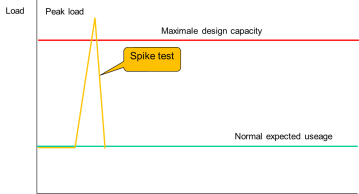
Spike testSo alternatives needed to be found. One obvious alternative is setup a transaction in SAP which generates a boat-load of IDocs and sends the to the RFC port in one big bulk. This would generate a spike, such as shown in this image, rather than a guided load. In other words, this is not what we want for this test either. It might be a useful step for during a spike test, however the first tests to be completed are the normal, expected load tests.

The search for altneratives continued. At my customer, not a lot of automation tools were available, especially not for SAP systems. One tool however has been purchased a while ago and apparently is actively used: WinShuttle

Winshuttle seems to be able to generate the required load, based on Excel input, the main issue with Winshuttle however, was the lack of available licenses. There are two licenses available and both are single use licenses. This meant I would have to find a way to hijack one of the PC’s it was installed on, script my way through it and run the tests in a very timeboxed manner. In other words, not really a solution to the problem.

I then decided to look at this from a whole different point of view: what can I use to make SAP execute a bunch of transactions, is freely available and flexible enough to also monitor what is happening on several sides of the message broker? The answer that came to me was not quite what I had expected: AutoIt.

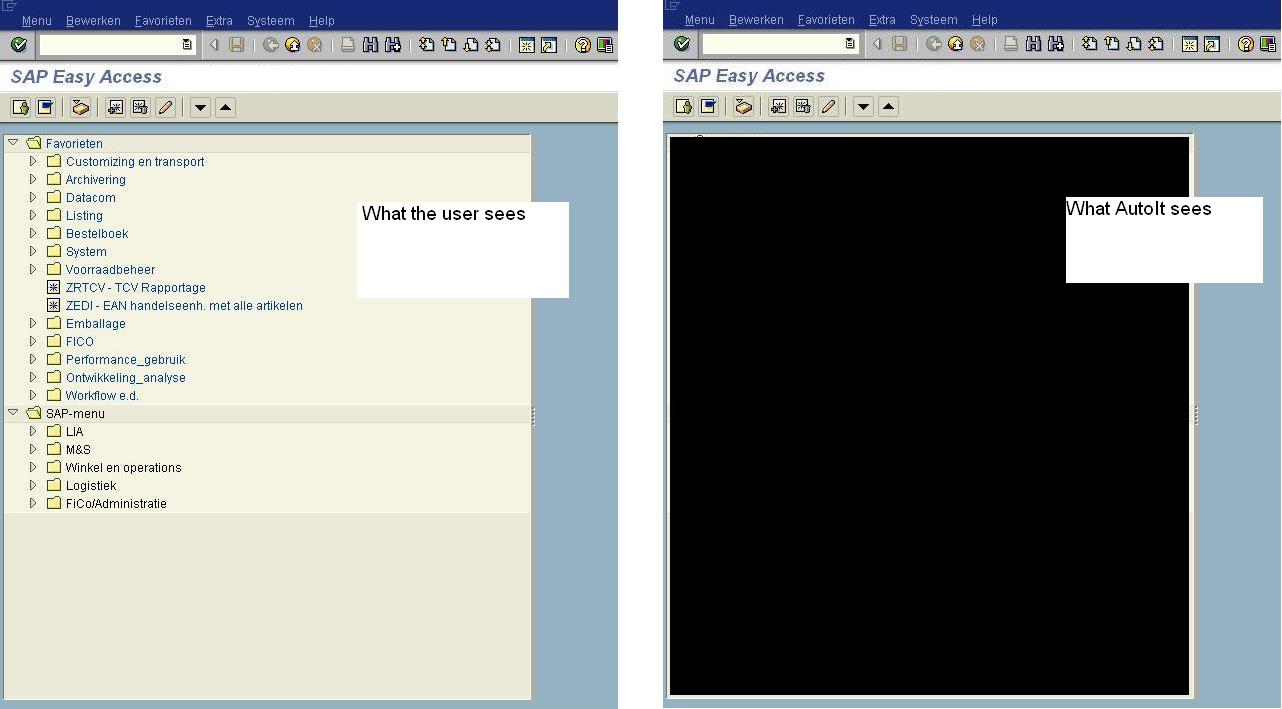
SAP-main-screen-side-by-side
Starting SAP from AutoIt was simple, running through the application and manipulating SAP however was a bit less intuitive.
In this screenshot two SAP screens are put side by side, the left-hand side is what the userinterface in SAP looks like to the end user. The right-hand side is how AutoIt sees the screen, e.g. a big blob of nothingness.

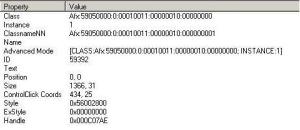
SAP-AutoItScreenInfo3

To be a bit more specific, here’s what AutoIt can tell us about the SAP toolbar:

In other words, AutoIt sees the entire toolbar as one object, with one exception, the edit box for transactions. This box has a very easy and intuitive name: Class: Edit Instance: 1, making it easy to ensure the focus on this box can be easily set and thus the transaction being started to upload files.

Since the main screen of SAP is a blind box to AutoIt we had to resort to a very sloppy way of working, using the TAB button to navigate through the screen, resulting in code roughly looking like this:

Send("ZWBESTUPL{ENTER}")
 If WinWaitActive("Bestellingen (winkel) aanmaken vanuit CSV-bestand") Then
    _log('Successfully selected the Bestellingen aanmaken vanuit CSV-bestand transactie')
    Send("{TAB 3}")
    Send("{SPACE}")
    Send("+{TAB 3}")
 Else
    _log('Something went wrong. Could not get to the Bestellingen aanmaken vanuit CSV transactie')
    Exit
 EndIf

load-graph The resulting load ramp up was a linear rampup of IDocs being generated and sent to the SAP RFC port, where they were picked up by the Message Broker and subsequently tranformed and sent back to the Locus system, where the load turned out to be quite on the high side.

All in all this was a fun excercise in automating SAP to do something it is absolutely not meant to do with a tool not built nor designed to do what it did. In other words, it was wonderful to be able to abuse a bunch of tools and achieve a very clear and convincing result!

JMeter and Oracle webcenter

I have started working on a project with lots of load & performance testing, which I really enjoy setting up and executing. However one of the tasks is L&P on a new implementation of Oracle ADF WebCenter, which turned out to be somewhat of a headache. The tools I use for L&P are typically Apache JMeter, Fiddler2, BadBoy and possibly The Grinder, JCrawler or LoadUI.

For the testing of the Oracle WebCenter I picked JMeter. 

The site under test is an intranet with a sizeable community using it. Especially start of day has a tendency to give some heavy hits on the most dynamic pages of the site, so these pages were my focus area. Unfortunately these pages are all behind a login. This login is generally, since the majority of these users use IE, done via Single Sign On where WebCenter verifies the user based on the Windows credentials and grants access based on that.

Going through the SSO login is not possible with JMeter, first of all since JMeter is not a browser, it merely acts to a certain extend as a browser and secondly JMeter has no access to my Windows username, at least not as far as I know. So I got served a login page. Usually getting past a login page with JMeter is fairly easy, the login page I received however didn’t like my passing a username and password in the post call via HTTP (intranet, so no SSL used obviously, cause the intranet is “safe”, right?).
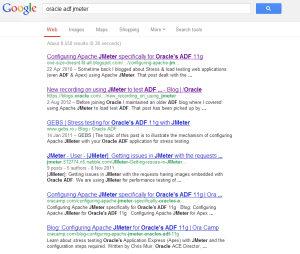
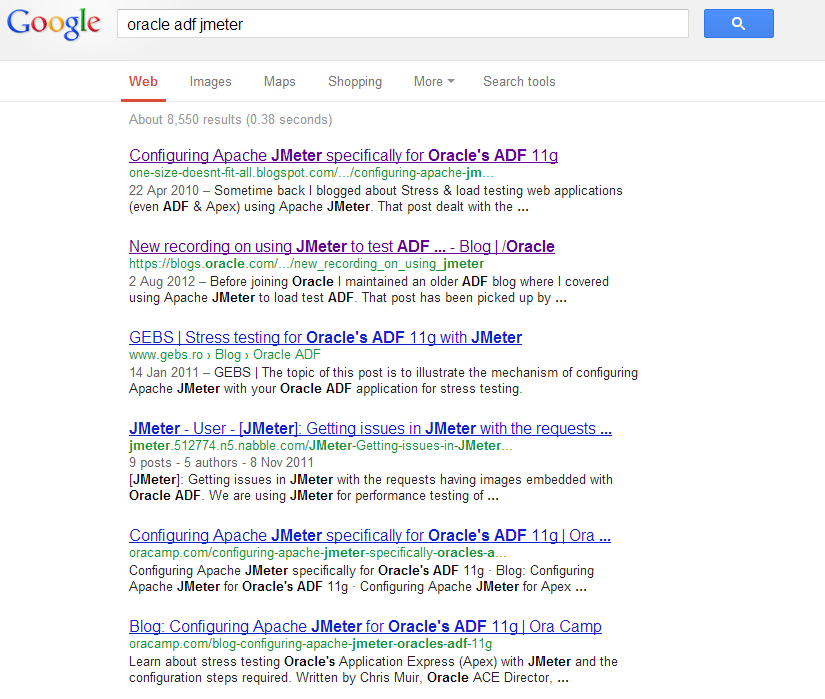
Oh well, let’s google how to get through to the WebCenter main pages. It’s Oracle so someone is bound to have written something sensible about it! Googling the terms “Oracle ADF Jmeter” gave me some nice hits. Titles such as “Configuring Apache JMeter specifically for Oracle’s ADF 11g” or even better, a post on the Oracle Blogs “New recordings on using JMeter to test ADF applications” including links to a demo video.

Some excerpt from these posts:

Sometime back I blogged about Stress & load testing web applications (even ADF & Apex) using Apache JMeter. That post dealt with the generic setup of recording a web session and then replaying under load via JMeter.

In the demo video a bit of a delusional idea of recording and then playing back the Load test “… is a free tool for essentially recording any HTTP session … and then you can replay it …”  (this is in the beginning seconds of the demo, so no need to watch the entire thing.

Why do I highlight these two things so much?

In order to answer this I want to first of all thank Chris Muir for his efforts both on his personal blog and on the Oracle blogs to show that JMeter can be used with the fuzzy logic that is the login of Oracle ADF. However I strongly disagree with the approach of recording and playing things back, especially with an application containing a lot of  ” fuzzy configuration you must get exactly right otherwise ADF gets confused by the messed up HTTP requests it receives from JMeter” as Chris states himself.

Since there is so much fuzziness, to stick to his terms, going on in ADF, it is a lot more sensible to try an understand what it is ADF is looking for. In order to do this one should not record and playback. When recording and playing something back you rely on the “magic” of software. You are not sure what you’re doing, let alone that you can make any clear assumption on what has been “tested” if anything at all for that matter.

So, how do you go about learning how the ADF platform works without having developer access to the beast? You start dissecting it bit by bit. This is why I love doing load & performance testing, it is like solving a puzzle.

I started off by walking through the login flow in Firefox with FireBug switched on. Firebug integrates with Firefox to put a wealth of web development tools at your fingertips while you browse. You can edit, debug, and monitor CSS, HTML, and JavaScript live in any web page.
Firebug gave me the URL’s I needed, so I started to get an understanding of the calls being made, but it didn’t provide me sufficient input yet for getting through the full login flow. In order to get on with this I needed to go a bit deeper, I needed Fiddler.

Fiddler is a Web Debugging Proxy which logs all HTTP(S) traffic between your computer and the Internet. Fiddler allows you to inspect traffic, set breakpoints, and “fiddle” with incoming or outgoing data. Fiddler includes a powerful event-based scripting subsystem, and can be extended using any .NET language.Fiddler is freeware and can debug traffic from virtually any application that supports a proxy, including Internet Explorer, Google Chrome, Apple Safari, Mozilla Firefox, Opera, and thousands more. You can also debug traffic from popular devices like Windows Phone, iPod/iPad, and others.

Passing all traffic through Fiddler, with a filter on the specific domain I was working on made things even more insightful than they had been with Firebug. I all of a sudden noticed the HTTP headers being passed around in my browser differing from the ones in JMeter, so I adjusted JMeter to pass all the same information. The header manager now contains something like the example shown here. Where one of the most important things to add is the referer.

The fact that I made the rest of the header act fully as if it is a webkit or Mozilla browser makes little to no difference, the main thing to do it ensure you add a referer URL to the HTTP headers. This referer needs to be constantly set dynamically, if you need to figure out how to do it, Nabble.com has an excellent explanation for it, but in short it comes down to this:

Thread Group
+HTTP Header manager (Referer = ${Referer})
+set the initial value of the variable Referer as blank or deal with the
first request differently (for e.g. if you dont want the referer at all) in
wh
+Simple Controller
Request 1
Request 2
Request 3
....
++Regular Expression Extractor (as a child of simple controller so that it
applies to all requests)
Name = Referer (same as the header manager variable)
Choose URL in the radio button ,
Expression=(.*)  Template=$1$ (i.e. we get the whole URL)

Get this part right and the rest of building your load test for Oracle ADF is going to be a lot easier. As stated before, the Oracle ADF stuff is not intuitive, getting the HTTP headers right however will help a lot in getting on the right path to logging in.
Besides the headers some more information is, or at least can be, required to get through the login flow. For our configuration I’ve had to deal with a total of 13 redirects which had to be rebuilt from scratch, during the first batch of redirects all kinds of information is gathered about the user session and the state of the user in a set of variables which are needed to be passed on, so be ready to add some nice RegExp extractors to URL’s here and there.

These redirects should be executed by JMeter as a next step, not by Follow Redirects. So please make sure you have that switched off. If you do not do this you will get in a state where ADF says the user session has expired, which is just ADF’s way of saying it doesn’t know who the current session is because the ADF HTTP state parameters JMeter is sending to the ADF server are not what it expected.

It took some trial and error to get it working, but by building it fully by hand rather than by using record/playback (which is not a good option for any type of reusable automation in my view) I learned what ADF is expecting and I now have a set for load & performance testing which I can leave with my customer without having it stuck to a particular session, base URL or user. It is fully reusable and can be run by anyone who can fill in a username and password and then hit the Save and Run buttons.

The difficulty of course lays in the tail, interpreting the outcomes of the test. But that is inherent to Load and Performance testing!

Test automation on SAP, is it really that much different?

SAP logo This year I got to know SAP fairly intimately, looking at it and into it from a test automation perspective, inventorising the possibilities and opportunities of automated testing of a (huge) SAP implementation. During this time I ran into a fair amount of SAP related people, ranging from SAP consultants and sales people to ABAP-developers, HP sales people and SAP preferred suppliers. They all are making it seem as though SAP development and testing is a different world, nothing to do with the “normal” software development world. In my view this is wrong, SAP is just software. Yes, it has a bunch of particularities which you do not get in so many other packages, but in terms of the actual functionality it is fairly comparable to Siebel and Oracle (no, I am NOT saying it’s the same, I am merely saying it is comparable). With neither Oracle nor Siebel this almost religious separatism exists, yet they too are bound by the laws of business process models, transaction codes and what not. So how come SAP is seen as so special and the others are not? Is SAP special? SAP TAO & HP Quality CenterWhen you start talking about test automation and SAP the first things that pop up are some SAP proprietary names such as CATT, eCATT and SAP TAO. Fortunately SAP themselves recommend against the use of either CATT or eCATT, so let’s dismiss these right here and now, they are tools that once were somewhat helpful but now should be considered redundant for most SAP implementations. SAP TAO however is of a different breed. SAP TAO is pushed by SAP as being the solution to use when trying to automate your testing. One minor issue with SAP TAO however is that it does not really automate anything on its own, you invariably need HP Quality Center (HPQC) and Quick Test Professional (QTP) with it. HP tooling has some tailor-made solutions to integrate well with SAP TAO and more specifically with the SAP Solution Manager. The setup as proposed in this picture is the ideal picture as SAP would like to envision and implement a SAP testing solution. However, not all organisations have Solution Manager up and running for anything other than transport and low level reporting, nor do all organisations have the budget for the HP tool set. When working with SAP TAO effectively and efficiently, the Business Blueprint, the description of all business processes as used by the organisation with the SAP systems, should be residing in the SAP Solution Manager. This blueprint should be maintained carefully and always be up to date. When changes to the system are made, either by updates to the system or by customizations in ABAP, these changes should be visible in the Solution Manager, ensuring the SAP Solution Manager Business Process Change Analyzer can identify which processes have changed and based on this impact analysis propose tests within HP Quality Center to be executed. With SAP TAO the testers can “automate” the tests, which effectively means record the steps. SAP TAO then adds some secret sauce by cutting longer scripts up into maintainable and reusable chunks. These scripts will then be sent from SAP TAO into HPQC, where they can be associated with functional test descriptions. When a tester now wants to run one of the automated tests, or for that matter wants to run the entire automated suite,  HPQC is used again to trigger the scripts, which get executed with QTP. In other words, the actual testdriver is QTP, not SAP TAO. When starting up a SAP GUI instance and analyzing it with something like UISpy or some other tool which can show the objects on a screen, the fields and buttons are barely visible and not really open to test automation. Yet it is possible. If SAP is configured to enable scripting, the UI objects become accessible and thus the GUI is scriptable with any tool of your choice. The moment this little flag has been set, a whole new world opens up in the GUI, it’s all of a sudden open, the fields, screens and buttons all have an ID and can be hooked into by a driver of your choice. Effectively what the enable scripting setting does, is ensuring non of the huge, expensive tools mentioned above are needed, it is possible to run through the application with any driver you want. The main thing needed in order to properly and solidly automate testing in SAP now, is a well grounded knowledge of the Business Processes the implementation is supporting (or driving).  This is no different than what is needed when automating SAP with SAP TAO. The benefits of having the option to choose your own drivers, your own programming language and your own reporting framework are huge. If SAP is merely in the organisation to support the business processes and software developers within the organisation are writing their own code in Erlang, C++, C#, Java, Ruby, Python or whatever else you can imagine, the testsuite for SAP can be in that same language. Having the automated testsuite in a well supported language rather than just in QTP’s own VBScript, ensures a larger possible support base for the automated tests. It enables easy integration of home-built software with the SAP systems since all tests can be built in one language and in an end-to-end setup, again supported by the organisation’s own development group. The SAP TAO and HPQC setup do have some benefits of course. First of all, there is a huge corporate support for both HP and SAP software products. But more importantly, there are some technical benefits of using SAP TAO, if the environment is setup properly. As mentioned above, there is this tool called the Business Process Change Analyser, or BPCA, which can help extract transaction based changes from a transport and help the tester decide, based on these changes, which test scenarios need to be run to effectively cover the business processes (or mainly the transactions associated both directly and indirectly to the transport). Next to that there is the benefit of using HPQC, I can hardly believe that I am saying this, since I am personally not a big fan of the HPQC suite, however the reporting possibilities and capabilities within HPQC are close to limitless. This means that it is possible to generate excellent reports, automatically, for both management level execs and for the business analysts and ABAP-specialists, on each test run without having to think about it. Having the full benefits of this setup however comes at a cost, a fairly sizable cost. The licensing for HPQC, QTP and SAP TAO or not to be ignored for starters. A hidden cost lays within the organisation, as stated, for the BPCA to do anything, Solution Manager needs to be utilized fully, the Blueprint needs to be ready and up to date, more over, it needs to be well maintained to ensure it remains the “Single Source of Truth” (as SAP coined it). So, to answer the initial question: Is SAP special? It is, as a business process tool, definitely special, strong and extremely versatile. When looking at SAP as a system that requires testing and test automation however, I am not convinced it is special, it’s just software, which is open for testautomation with a range of drivers, one of these drivers might be QTP. If you do indeed choose to go for QTP with a SAP system, have a look into SAP TAO. However, do not feel that it is the only one out there which can effectively and efficiently be used for SAP test automation. All the others claiming they can, probably indeed can just as well as SAP TAO with QTP. In the end it is all about how you use and abuse a tool and whether you use QTP, White or Panaya, they all in the end merely function as a driver, it is the code the testers build which matters!

The cost of test automation

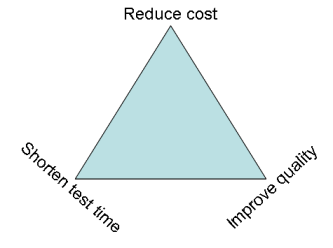
Over the past few posts I have written a lot about test automation, however one very important subject I have left out thus far. What is the actual cost of test automation? How do you calculate the cost of test automation, how do you compare this cost to the overall costs of testing? In other words, how do you get to the return on investment people are looking for? First thing that needs to be covered if you want to know and understand the costs of test automation is a CLEAR understanding of the goal. Typically there are three possible goals:Cost, quality or time to market?

  1. reduce the cost of testing
  2. reduce the time spent on testing
  3. improve the quality of the software

These three have a direct relation with each other, and thus each of them also has a direct impact on the other two depending on which one you take as your main focus. In the next few paragraphs I will discuss the impact of picking one of the three as a goal.

Reduce the cost of testing

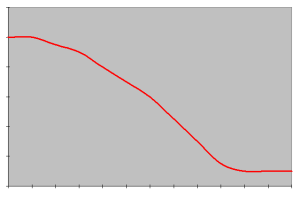
When putting the focus of your test automation on reducing the overall cost of testing you set yourself up for a long road ahead. There generally is an initial investment needed for test automation to become cost reducing. Put simple, you need to go through the initial implementation of a tool or framework. Get to know this tool well and ensure that the testers who need to work with the tool all know and understand how to work with it as well. If going for a big commercial tool there is of course the investment in purchasing the license, which often ranges between 5.000 and 10.000 euros per seat (floating or dedicated). Assuming more than one test engineer will need to be using the tool concurrently, you will always need more than one license. This license cost needs to be earned back by an overall reduction in testing costs (since that is your goal). An average investment graph will look something like this when working with a commercial tool: Investment of test automation with a commercial tool

The initial investment is high, this is the cost of the licenses. At that point there is nothing yet, no tests have been automated yet and you have already spent a small fortune. The costs will not drop immediately, since after the purchase the tool needs to be installed, people need to be trained etc. Next to it, all the while no tests have been automated, thus the cost is high, but the return is zero. Once the training process has been finilised and the implementation of the automated tests has started the cost line will slowly drop to a stable flatline. The flatline will be the running cost of test automation, which includes the cost of maintenance of the tool and the testscripts and of course the cost of running tests and reviewing and interpreting the reports.

A particular post in a LinkedIn group with the ominous question “Who’s afraid of test automation”, one of the more disturbing responses was as follows (and I am quoting from the group literally, with a changed name however):

Q: Who’s afraid of test automation?

A: Anyone with headcount. What would it look like if all of the testing is done by machine and there is only one person left in the organization?
Respectfully, Louise, PhD

The idea that test automation will take away testers’ work completely and as such will reduce the running costs of a test team drastically is a common misconception which takes too much time and effort right now to address. But in short, Test automation may reduce some of the workload, but will not be able to reduce your cost of testing by removing all of the testers, nor should this ever be your objective.

In my next blog post I will continue this story, then with the focus on “Reduce the time spent on testing”